Wife has never seen any James Bond movies. We’re binging our way through the Daniel Craig ones.
I like Daniel Craig as Bond.
Wife has never seen any James Bond movies. We’re binging our way through the Daniel Craig ones.
I like Daniel Craig as Bond.
Oh man. The Eagles are ranked below the Jets in the power rankings. That’s when you know you’re bad.
Got a nice shot of the coast from the pier this morning.

Not a bad way to start the day.

I recently bought a 2020 iPad Air. This new iPad Air is an upgraded from my (2016) iPad Pro 9.7”. That old iPad Pro was probably my favorite iOS device. I used it all the time. In the last few months, the iPad Pro was starting to slow down a bit. It was time for an upgrade.
I love the design of the this iPad Air. I think it looks great. It’s a much ‘flatter’ design compared to my old iPad Pro.
The home button is also gone, which means the bezel around the screen is smaller. There’s still a Touch ID sensor, but it’s now on the power button. I would probably prefer the Face ID capabilities of the new iPad Pros.
I use iPads a lot. I use them for most of my personal computing. The only thing I don’t use them for is writing code. Xcode is not on the iPad (yet?), so I still need to use my Mac writing code. The new iPad Pros were a bit outside of my price range and I’m not sure if I would need or use all of the features on the iPad Pro. I may regret all of this if/when Apple announces iOS development on the iPad Pros.
In the future I may go back to an iPad Pro. That decision will be for “future Ryan.” That new screen on the iPad Pro 12.9” looks amazing. But for now I am really happy with my choice.
Along with the iPad Air, I also bought the Magic Keyboard and Apple Pencil.
The price of the Magic Keyboard was a bit steep, but I’ve been very happy with it so far. I’m using the Magic Keyboard to write this blog post. I think an external keyboard of some sort is a necessity for the larger iPads.
I’m still torn on the Apple Pencil. I had one with my old iPad and rarely used it. I think it will end up being something I use from time to time. I’m not sure it’s a necessity for me.
I’ve been thinking with ways to use my iPad as a development machine. I haven’t figured it out yet.
I have Screens installed and am using that as a VNC client to my Mac. I’ve been trying that so that I can use Xcode. Yeah, I know that I could just use my MacBook Pro. I’ve been thinking of getting an M1 Mac Mini and using my iPad when I am not in my office.
I’ve tried a handful of editors for web development and just haven’t found one that I like yet. I would like it to do both text editing and git management, but haven’t been happy with any of the options.
I’m going to keep looking. I really want to make it work, I just don’t know if I can. Yet.
So far I am really happy with the new iPad Air.
This morning’s listening is Nirvana: MTV Unplugged In New York (Live). It is such a great album.
Breaking in a new toy tonight.

Sold off my old OG HomePod. I still have a pair of HomePod minis, but haven’t been super thrilled with them. Siri has been terrible with all of them. Planning a move to Sonos (once they are back in-stock). Good idea? Bad idea?

I’ve just wrapped up a handful of changes to the site. The site mostly looks the same, but there have been pretty large changes under the hood.
This site runs on Jekyll. It’s a platform that takes Markdown and converts it to HTML. Previously, I was using a pre-built theme called Lanyon.
The theme looks great, but there were a few things that I didn’t quite like about it. The navigation was an issue for me. I am not a fan of hamburger menus on websites. I never liked the navigation, but I didn’t have much interested in changing it, until now.
I also wanted to take some time to add both a portfolio page and my resume.
Over the last week, I took the time to make these changes. I decided to remove the Lanyon theme entirely and roll my own “theme” using Tailwind CSS. What I have now isn’t much of a theme that can be packaged and distributed, but I built this myself. It still looks a lot like the Lanyon theme, but I know how it works and won’t have much issue adding and tweaking things in the future.
Now, the navigation is across the top of the site. And I’ve also added the portfolio and resume pages. I’ve made a handful of other minor changes throughout the site. Most of the changes were under the hood and will hopefully go unnoticed.
This is something that I’ve been wanting to do for a long time. I finally got around to it and I am happy that I did.
I spent the last few days on vacation. We didn’t go anywhere (other than a soccer tournament - in the rain), the kids had school and my wife was working. So, what did I spend my time doing? Writing code. Obviously…
I’ve been working a big update to Beer Style Guidelines. The updates include a lot of “new” iOS features. These include:
All of this and I’m still trying to learn (and use) Combine and SwiftUI. I was very excited when those technologies were announced (almost) 2 years ago. I just haven’t had the ability to use Combine or SwiftUI at work. I’ve used them here and there in my side-projects, but not enough to feel proficient in them.
So, why am I spending my vacation time learning about these features and implementing them? Honestly, I don’t get an opportunity to learn and work on this during my day job. At work, we need to support iOS 11/12+ (depending on the app). That means that I don’t get to use the new hotness at work. So I need to do this learning and implementing using my side-projects.
Using my vacation time to learn “new” (well, almost 1 and 2-year old) technologies isn’t ideal. But I feel like this is something I need to do. It’s either this or continue to feel like I’m always behind in iOS development.
I’ve made a lot of progress on my update to Beer Style Guidelines. I hope that I can get this latest update out into the App Store before WWDC. That will give me the opportunity to start learning the next set of iOS features I want to implement over the Summer.
I started running a long time ago. The first run I logged into Nike Run Club was in August of 2006. I think I started running a year or two before that.
The reason that I started running was that I was fat. Seriously. Looking back at the photos, it looks like I ate one of my kids. I weighed roughly 60lbs more than I do now. I think I used to wear size 38 or 40 jeans (loose fit).
I started by walking. That worked for a while, and then I decided that I wanted to run. I had never really run before this. But I decided that it was something I wanted to do. So one Saturday morning, I went to a local park (with a circular trail) and I ran one lap, and then walked a bit. Then I did it again. I think I did it three or four times before calling it a day.
Since that day, I have run miles and miles and miles. In Nike Run Club, I’ve logged over a thousand miles. I’ve also logged hundreds of miles in RunKeeper and hundreds of miles on my Apple Watch. This doesn’t include the miles and miles I’ve run without any sort of tracker.
I’ve run in countless 5k events. I used to sign up for a lot of these each year. My brother and I used to run these together all the time. At one point, I did well enough to finish in the top 5 (or 10) of my age group.
Then I started running in half-marathons. I think I ended up running in 3 or 4. I still have the medals for these in the basement somewhere. The best of these that I ran was under 2 hours for a half marathon. This was probably at my peak running. I loved running during this time and loved competing in half marathons.
Somewhere along the line, I got it in my head that I wanted to complete a full marathon. So my brother and I signed up for the Philadelphia Marathon and started the training. I ran almost every day. It got to the point that if I was scheduled to run for less than 6 miles on a given day, it just wouldn’t feel worth it.
Finally, race day came and I felt great through about 13.1 miles. The halfway point was also the endpoint for the half marathon (duh). When I got there, I almost decided to end it there. But I continued.
We finished the race, I had to walk more than I wanted. I also finished slower than I wanted. I hated myself for the last 3 or 4 miles. But I finished, that’s the important point.
It’s funny. I loved running before the marathon. Since the marathon, I don’t really want to run to train for anything anymore.
I still run. Usually once or twice a week. I have a day where I’ll run for 10 minutes to finish my workout and another where the entire workout is a run. I don’t enjoy it as much as I used to, but it gives me time to listen to a book or catch up on podcasts.
I also run on vacation or while traveling. Running is an easy exercise to plan out. I don’t need to find a gym, or bring equipment, just a pair of running sneakers.
I have zero interest in ever attempting another (full) marathon again. A half-marathon was the sweet spot for me. There’s a part of me that wants to run another half-marathon, but I’m not sure if I have the conviction to see that through.
🏃🏻♂️
This is the final post in a series on adding UIKeyCommands (keyboard shortcuts) to an iOS app. In this post, we’ll cover how to add menu bar items to a macOS Catalyst app using UIKeyCommands.
This will not be a full tutorial on how to add menu items to macOS Catalyst apps. Instead, this post will demonstrate that you can use the same keyboard shortcuts created in part two and create menu items.
In macOS Catalyst apps, your UIApplicationDelegate class (usually AppDelegate) will configure the menu bar. This is handled in the func buildMenu(with builder: UIMenuBuilder) method (documentation). In this method, you can add and remove menu items and sub menu items.
You can download the corresponding sample app here (the branch is part-3-catalyst). I slightly refactored the code that creates the UIKeyCommand to be a class level variable on the two view controllers. They can now be easily accessed like: TableViewController.showTableAlert.
Use the existing UIKeyCommand objects in a UIMenu initializer and then added to the builder object in the buildMenu method (from above) like this:
let menu = UIMenu(title: "Show",
				  identifier: .show,
                  options: .displayInline,
                  children: [TableViewController.showTableAlert,
                             DetailViewController.showDetailAlert])

builder.insertChild(menu, atStartOfMenu: .file)
This little block of code adds the “Show Table” and “Show Detail” menu items. When you run the app, it will look like this.
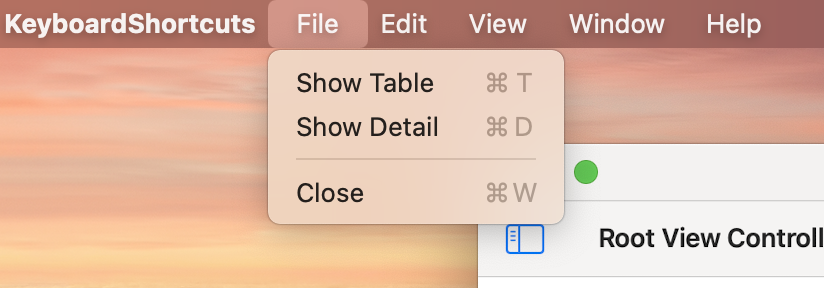
That’s it. That’s really all there is to it to take existing keyboard shortcuts and add them to a macOS Catalyst app as menu items.
UIKeyCommand object are incredibly versatile in the situations we’ve gone over in this series. They can be added to both simple and more complex apps. They can also be used in macOS Catalyst apps to provide menu bar items.
In the first post in this UIKeyCommands series, we went over the basics of UIKeyCommands and adding keyboard shortcuts to an app. Adding keyboard shortcuts to a real app can be a little more complicated, but not much.
My latest update of Beer Style Guidelines has these keyboard shortcuts reenabled. A long time ago, I had keyboard shortcuts enabled within the app. At that time, I didn’t have a clear understanding of how they worked. This lack of understanding meant that the keyboard shortcuts didn’t quite work the way I expected them to (or at all sometimes).
I became frustrated with my lack of understanding and I just disabled the keyboard shortcuts. I didn’t have a lot of time to investigate and figure out what was wrong. But I was determined to figure it out. Recently, I had purchased an iPad Air (4th Generation) and an Apple Magic Keyboard. This gave me the kick in the butt to get the keyboard shortcuts working again.
Getting the keyboard shortcuts working wasn’t a lot of work. I just lacked an understanding of how to put it all together. I hope to impart some of that wisdom in this post.
Beer Style Guidelines has a Split View Controller view architecture.

In my first iteration of keyboard shortcuts, I had two or three commands. They were all triggered from the Detail View Controller (the large part of the screen). I wanted to add more keyboard shortcuts, but I was paralyzed with not knowing how to proceed.
Ok. So, what was holding me up? I wasn’t sure which view controller in the app I needed to implement the keyboard command. Did I need to add them all to my Split View Controller class? Did I need to implement the commands in one view controller or the other, based on a user’s focus?
I started by adding the commands to the split view controller class. But it turns out that isn’t the correct answer. The correct answer is that you implement the keyboard commands wherever you need them, and let the Responder Chain take care of the rest.
In iOS, there is this thing called the responder chain. The responder chain is how iOS (and UIKit) determine how to handle events. This chain starts with the first responder and then traverses the rest of the chain looking to handle the event. In the case of UIKeyCommands, UIKit will traverse the responder chain and collect the UIKeyCommands for the current scenario.
This WWDC video (Support hardware keyboards in your app) does a fantastic job of explaining all of this. It’s also super short. I only discovered the video after I figured out how this works.
You may have noticed that the UIApplicationDelegate class (usually called AppDelegate) is a subclass of UIResponder. What you may not have noticed is that all UIViewControllers and even UIViews subclass UIResponder.
Getting back to where to implement the keyboard shortcuts. I ended up implementing the keyboard shortcuts for the list view (search, change guide, etc), in the list view controller. The keyboard shortcuts used in the detail view controller (like toggle favorite, next/previous section, etc) were implemented there.
Like in part one, I’ve created a sample app to put this into practice. This sample app uses a Split View Controller and implements keyboard shortcuts where it makes sense. The sample app only has a few keyboard shortcuts.
The list view controller has two keyboard shortcuts and so does the detail view controller.
You may notice something strange about these keyboard shortcuts. Both have the “Show Info” keyboard shortcut. I did this as a test more than anything. I wanted to see what would happen if there are duplicate keyboard shortcuts. Likewise, I also wanted to see where this was called from when triggered. I discovered that found that the keyboard shortcut in the detail view controller usually wins. I think that’s because it’s the first responder in the chain that responds to this command.
This may feel a bit overwhelming. But it’s not very difficult. The sample app should give you a better idea of how easy it is to implement keyboard shortcuts in a split view controller.
There’s one more post in this series. Next time, we’ll stray away from iOS slightly to use UIKeyCommands to add menu items to a macOS Catalyst app.
This post is the first in a series of three on UIKeyCommands on iOS. In this first post, we’ll go over UIKeyCommand at a high level.
UIKeyCommands represent a key press (or combination of key presses) on a hardware keyboard that will trigger an action. In short, you can think of these as keyboard shortcuts. The system already has a few built-in keyboard shortcuts. Some of these are keyboard shortcuts are Cut (⌘ + x), Copy (⌘ + c), and Paste (⌘ + v).
Beginning in iOS 7, Apple started allowing developers to implement keyboard shortcuts. The system already handles Cut, Copy and Paste and developers won’t need to implement these.
These keyboard shortcuts have been around for a few years. So, it’s easy to see how other developers have implemented these. A great way to discover what keyboard shortcuts apps have is to launch the app, and then hold down the command (⌘) key. Here’s an example from my app Beer Style Guidelines.
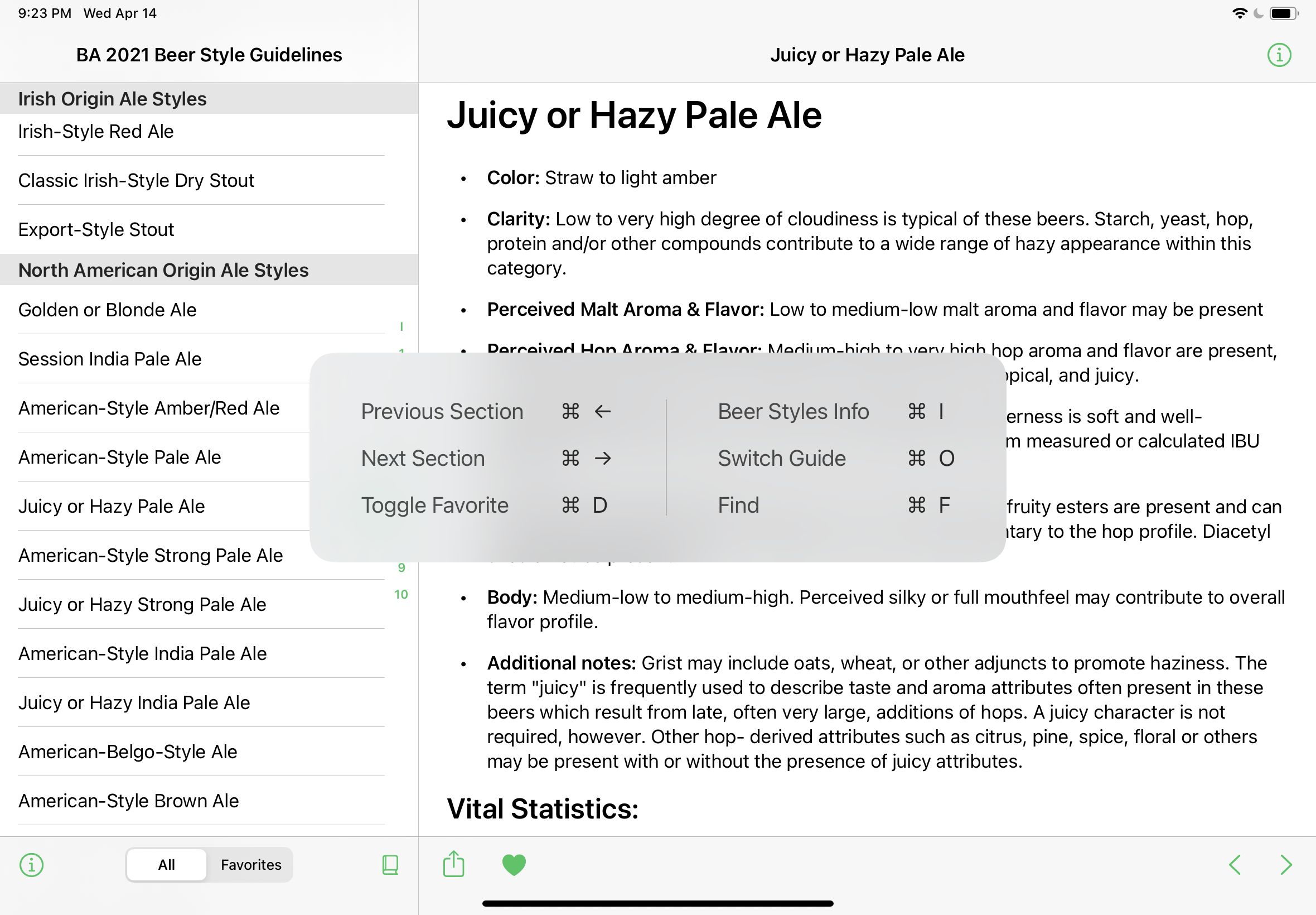
There are two parts to implement UIKeyCommands in your app. First, is the UIKeyCommand object itself. Then these UIKeyCommands need to be integrated into the app.
The initializer for UIKeyCommand has a lot going on. You don’t need to use every parameter. Here are the minimum parameters to create a UIKeyCommand object. Those parameters are:
title: This is the display title of the keyboard shortcut.action: This parameter points to the method that gets called from this shortcut.input: This is the keyboard key (a string) that is part of the keyboard shortcut. For example, the “c” in the Copy shortcut (⌘ + c)modifierFlags: This is the modifying key that is the other part of the keyboard shortcut. For example, the “⌘” in the Copy shortcut (⌘ + c)Putting all of this together, you can create a keyboard shortcut like this:
let infoCommand = UIKeyCommand(title: "Show Info",
                               action: #selector(showInfo),
                               input: "i",
                               modifierFlags: .command)
In this example, the user will trigger a keyboard shortcut to show info when they use ⌘ + i. This will show them an iOS alert with a simple message in it.
I’ve created a sample app that pulls all the various pieces together. The sample app, is simple. It has a single keyboard shortcut. You can discover this just like keyboard shortcuts in other iOS apps.
Download and run the sample app. Once launched, hold down on the Command key (⌘) until you see the prompt showing the single keyboard shortcut within the app.
If nothing shows up, and you’re testing this in the simulator, you may need to enable “Send Keyboard Input to Device” in the simulator. This can be done through the menu system by selecting I/O → Input → Send Keyboard Input to Device. Or, you can click on this button in the toolbar (below) of the simulator. Without doing this, sometimes the keyboard shortcuts can be lost, and it will seem like the keyboard shortcuts are not working.

That’s it. Keyboard shortcuts are straightforward to set up and get working in your apps. Next time we’ll get a little more in-depth on UIKeyCommand.
It’s been a busy month. I’m not even sure where the month went. I figured I’d post a general update on what I’ve been up to.
I’ve been super busy at work, working on a new (to us) property. I’m not sure if I can announce what that property is yet, so I won’t. Once it launches, I’ll probably post an update here with more info.
As far as personal projects go, I’ve shipped a large update to Beer Style Guidelines. This update includes the Brewers Association 2021 Beer Style Guidelines. The release notes are here. I love updating the app with new guides as they come out, but I always forget how much work it is. I do a fair bit of testing the guide out before I release it, but I just know that I’m going go missing something.
This last few weeks, I’ve been really busy working on a few server components to another update to Beer Style Guidelines. It’s not ready yet and users shouldn’t notice any difference in how the app works. But this new set of server components it building towards some future features.
I haven’t been playing many video games this month. I’ve been so busy with the development updates above, it doesn’t leave a lot of time for playing video games at night.
I’ve dabbled in a few new games, but nothing has really hooked me. I think if a game hooked me, I’d find a way to play the game more.
Some of the games I’ve started:
I probably spent the most time playing LEGO Harry Potter Collection. I love LEGO games, they aren’t usually hard, and I can let my mind wander a bit while playing through them.
I stared Gears of War, but didn’t make it too far in. I’ve played through this game a few times, years ago. I have a lot of fond memories playing through these with my brother. But I just couldn’t really get into it again.
I finished the Pikmin 3 demo, but not sure I’m ready for the full game yet. I love the early game of Pikmin games, but I always get to a point where I get frustrated with the games. It’s probably because I’m bad at video games. I’m still debating whether I want to get this game or not.
I tried Hollow Knight. I’ve heard so many good things about it. It made me realize (even more) that I’m bad at video games. I couldn’t even get past the first boss (False Knight) before getting frustrated and giving up. I feel like I should keep at it, but I am just so bad at this game.
I’ve read a handful of books this month. Looking back at the list, it was more than I expected. I listen to most of my books. It makes it much easier to enjoy books while I go for walks, runs, or while driving in the car.
In March, I finished these books:
Bossypants was a fun, quick read. I like Tina Fey and the work she’s done. This book was written during her time working on 30 Rock (which was a great show). Tina is also an Eagles fan, so that helps immensely.
I am a big fan of the new Star Wars: The High Republic content that’s been coming out this year. It’s an entirely new era being discovered in Star Wars. I’ve been keeping up with the novels and comic books in this ear and have really been enjoying them. I listened to about half of this book in a single day during a long road trip.
I really enjoyed the art style in Star Wars: The Rise of Skywalker Graphic Novel Adaptation. The graphic novel adaptation gets the bulk of the story across from the movie and the (non-graphic) novel adaptation. I still enjoying reading comics on my iPad. Although, I only really list the graphic novels or omnibuses on my list of books I’ve read.
The Lead Developer book was an impulse read of mine. I saw it promoted by some iOS developers I follow on Twitter, so I decided to buy it. The book is a good first version. There were a handful of typos throughout the book, but I could easily see past those. But the book does give a good overview of what a lead developer’s responsibilities are and some practical tips on how to survive as one. This is a relatively short book that I read in 3 or 4 sittings.
This has been quite a busy month. I didn’t even cover the movies and TV shows that we’ve been watching. Maybe I’ll cover that in a different post, maybe not.
I hope to provide more frequent updates on the site. But I’m not always great with that.

This past weekend, I finished playing through Super Mario Odyssey on the Nintendo Switch. The game flew by for me. I hadn’t even realized I was near the end of the story, and there I was.
There isn’t a lot to the plot. If you’ve played any other Super Mario games, this one has a very similar plot. Princess Peach was kidnapped by Bowser and it’s up to you to rescue her. It’s not very imaginative. But playing the game is a lot of fun.
Once you’ve finished the game, you can go back to all of the worlds and attempt to collect Power Moons. I did not collect every Power Moon in the game. I’m not sure if I’ll even go back and play through more. I had just enough fun playing through the main storyline. It was the perfect amount for me.
It was a very fun game. It also wasn’t too difficult to get through the main storyline. I’d recommend this for anyone who enjoys 3D Super Mario games.
I also have Super Mario Galaxy on the Nintendo Switch. I never played through this when it was out on the Wii. I’m not sure if I want to play through that or look for something else to play.

Over the past week, I’ve made a handful of changes to the site. It’s been a long time since I’ve made any appreciable updates to the site. I’ve moved to a new host, implemented dark mode and added category support. I consider them quality of life updates. None of these changes are groundbreaking, but these are things I’ve wanted to do on the site for a while now.
Previously, I was using GitHub Pages to host the site. But I wanted a bit more control over things. This week, I moved to Netlify. Netlify has the same ease of use that GitHub Pages provides, but I get a bit more insight into what’s happening during site deployments.
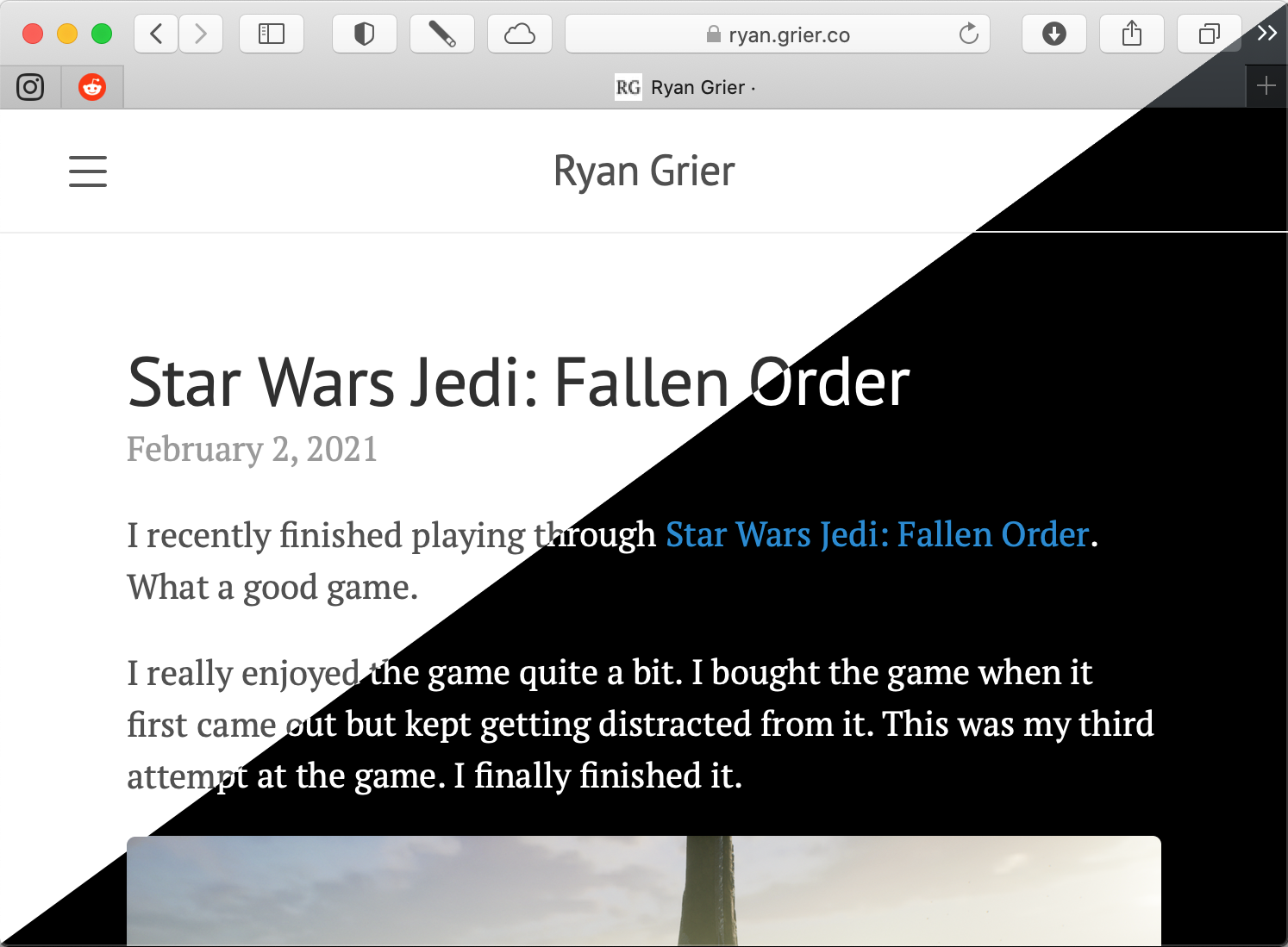
I’ve also implemented dark mode support on the site. I’ve been using a Jekyll theme called Lanyon for a few years now. The theme has been great, but it doesn’t support dark mode out of the box. Adding it wasn’t too bad, but I’ve probably done it in the most inefficient way possible and missed a handful of elements.
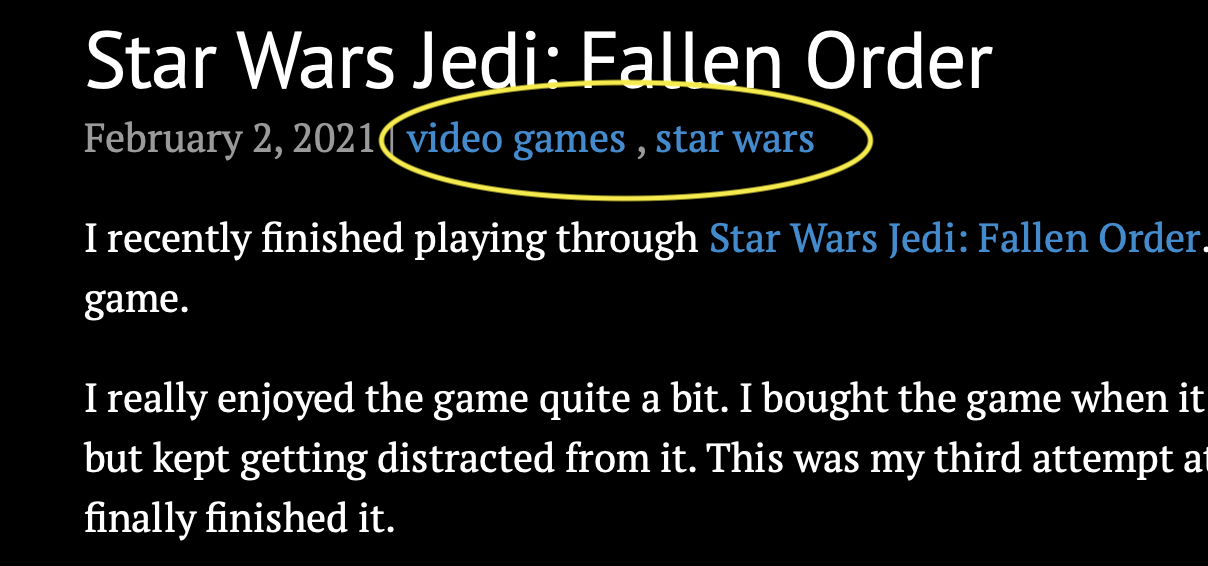
The lack of categories is something that’s been bugging me for a long time. I’ve finally added support for them. Well, kind of. Jekyll (the software that runs this site) already supports categories, but the Lanyon theme doesn’t (out of the box). Adding support for categories was easy enough. Each post will show the categories for that post (see the image above). I’ve also created a categories page. So you can browse posts by categories.
I’ve been thinking about a complete redesign for the site. I’m not sure if I want a new Jekyll theme, or if I want to roll my own design for the site. A new Jekyll theme would be an easy way to get a new look. The themes I’ve seen out there aren’t quite what I want. I’m not sure I have the time (or energy) to roll my own new theme/look for the site.
Please enjoy the new features of the site.
I recently finished playing through Star Wars Jedi: Fallen Order. What a good game.
I really enjoyed the game quite a bit. I bought the game when it first came out but kept getting distracted from it. This was my third attempt at the game. I finally finished it.

I played through the game on “Story Mode” which is the easiest difficulty. I used to play games on the hardest difficulty, but in the last few years, I just want to experience the story and not struggle with gameplay.
This game takes place a few years after Star Wars: Episode III – Revenge of the Sith . I won’t give away any spoilers here. But it was neat to explore a whole new storyline in the Star Wars universe. This game has a new set of (main) characters. Along with some villains that were introduced in Star Wars Rebels (an amazing TV show).

There’s this great Uncharted vibe to this game. You get to explore and solve puzzles in a variety of environments. I loved the Uncharted games, and this game feels similar. The story is also good, but I’m not sure if it’s because of the game’s story or because I really enjoy the Star Wars universe.
I would recommend this game to anyone who likes Star Wars and environmental puzzle games. But who am I kidding? If they are into those types of games, they’ve probably already played Star Wars Jedi: Fallen Order.
I’m not entire sure what I’m going to play through next. I’ve dabbled in a few games, but nothing has really grabbed me yet.
This past weekend, MyCntdwn took a step forward. I sent a new build of it to Apple’s TestFlight. It’s the first time a MyCntdwn build has been uploaded to TestFlight in years.
This doesn’t really mean anything is going to happen with it. I just wanted to upload a new build so that I can test things on multiple devices in a (more) real world environment.
Once I downloaded the TestFlight build, I immediately found 5 or 6 bugs. My iCloud syncing also didn’t work. But at least that gives me some important information. It gives me plenty of things to look into.
I haven’t had a lot of time to invest in MyCntdwn so far this month. I’ve got another app (through work) which is shipping very soon and has captured most (if not all) of my attention. I hope things change soon. Either that, or I’ll be totally burnt out on dev work and need to just sit and stare at the wall for a while.
Either way, I’m happy with this latest step. It’s a step. It means that I’m moving forward and continuing with the process.
It’s a new year.
I am trying something a little different this year. Instead of setting goals for myself, I am going to set a few areas of my life (outside of family and work) that I am going to focus on. Family and work will come first, but I need something to do outside of those things.
I honestly don’t remember if I set any goals last year. I never posted about it, so it’s hard to say.
I’ve got a few broad areas that I want to focus on this year. Since I’m not setting many concrete goals, this may blow up in my face later. But it’s something I want to try out.
Fitness has been a focus area of mine for the last year or two. I’ve made some great strides in this area, but I want to get even better. I am slowly getting stronger and more fit.
I’ve slowly built up a decent home gym over the last year and half and have been using it almost daily. I want to continue this trend. However, I don’t want to move too far, too fast, because I’m not interested in getting injured. I’ve spent a few years dealing with injuries and pain, and I’m not doing that again.
I haven’t written much about fitness and my progress in the past. Maybe it’s something I can do this year.
I need to continue learning and growing as a developer. Sometimes I can get stagnant with the learning process.
Some layoffs late last year at my company have made me step back and realize that I need to continue to learn all the time. It’s how I’ll stay relevant where I am now and may help me in the future, if more layoffs come around.
This should be an easy thing to focus on. I just need to be more disciplined about it. I enjoy learning new things in my trade. I also like when I can show new ideas and concepts to other developers on my team.
I would like to continue applying new ideas like SwiftUI and Combine in both my personal apps and hopefully at work.
Last year I didn’t read as many books as I usually do. I managed to read 34 books, but have a long backlog of books I want to read. And that list is continually growing.
This is one area where I did set a specific reading goal. I want to read 35 books this year. I will be starting my first book of the year later today.
My first book will be Kenobi. It’s a Star Wars novel, and not even canon. Despite it not being canon, I’ve heard so many good things about it, I’m going to give it a shot.
I want to write more. Specifically, I want to write more to the blog this year. Last year I didn’t write much at all on here. Towards the end of the year, things picked up a bit. But I’m hoping to make this a more consistent thing. I enjoy writing, but I’m not great at it. I’m hoping that the more I write, the better I’ll get.
This is another place where I have a concrete goal. I’d like to write a post here every other week. This is the first of those.
I used to play a lot of video games. I enjoyed doing so. In recent years that’s gotten away from me a bit. For me, video games are a great way to escape from the troubles of the day.
I have a Nintendo Switch, Nintendo 3DS and an Xbox Series S.
Recently, I’ve been playing a bit of The Legend of Zelda: A Link Between Worlds and Star Wars Jedi Fallen Order.
I’ve missed the entire Xbox One generation, there are a lot of games from that generation that I’m excited to play.
That’s a lot of things to focus on. I may be spreading myself a bit thin here. Even if I do, I hope that I can at least find some things that I really enjoy.
In the coming weeks, I may go further in depth with each of these areas of focus. At least that’s the plan. We’ll see if I can stick to my “goals” here.
2020 wasn’t the best year. I’m hoping (like so many others) that 2021 is better.
2020 has been quite a ride. I’m glad that it’s over. It hasn’t been all bad, but the bad has really overshadowed almost everything else. It’s made this year a tough year for almost everyone.
This year has been a busy one at home. Luckily, everyone here has remained safe and healthy.
Our 12 year old dog passed away in April. She was a Golden Retriever and she was the best. But she also lived a little longer than we thought she would. I’m not sure we’ll ever had another dog as awesome as she was.
We bought a new puppy. This happened the night before things in our area really shutdown. We decided to stick with Golden Retriever. They have great temperaments and are a breed that we enjoy. The first few weeks with the new puppy were really rough while she got used to us and (eventually) sleeping through the night. Now she’s just another member of the family.
Family life has cycled from very busy to periods with nothing to do. It’s very strange compared to other years (where we are just busy). I won’t lie, I’ve enjoyed the down time from the usual fire hose of events.
The last few years, we’ve been taking trips to Europe to explore new countries. This year, our new tradition of European vacations was put on hold. I’m hoping we can get back over to Europe (and some new countries) sometime next year. We did get away on a single vacation to the Outer Banks over July 4th week. That was a nice escape from reality for a bit.
Work has been busy the entire time. I’ve been a remote employee for a few years now. When lockdown hit us, we didn’t miss a beat. While everyone else was trying to figure remote work out, we just kept chugging along.
In January, I took over as the iOS Tech Lead for DC Universe. I’ve been keeping that position since then. That role has been transitioning into the iOS tech lead for DC Universe Infinite, which is expected to launch in January.

Earlier this year, DC Universe was featured in the iOS App Store. It’s happened a few times before, but it never gets old to see.
Later in this year, I also became the iOS Tech Lead on Boomerang. I had worked on Boomerang a few years ago prior to its initial launch. It’s been nice to come back to this property and work on it again.
Boomerang has also been featured multiple times in the iOS App Store this year. I’ll be honest, it never gets old seeing this. And it’s always a pleasant surprise to see.

With leading up two different properties at work, it’s made for a super busy year. Sometimes too busy. I’m currently on a well earned vacation for the remainder of 2020. I have a feeling that next year will be another busy year, so I’m getting some rest while I can.
I have a number of goals for 2021, but I’m going to save those for another post. Posting more here happens to be one of those goals, so we’ll see how well I stick to that goal.
Over a year ago, I removed MyCntdwn from the App Store. But I’m not sure that’s the end of the story for MyCntdwn.
I’ve been working on an update to MyCntdwn for a long time now. I’ve had multiple starts and stops. This could just be another false start in the lifecycle of MyCntdwn. I’m not really sure just yet.
Working on MyCntdwn is a mechanism for learning new things. In my normal day job, I don’t usually get to play with the latest and greatest technologies. The apps I’m working on currently support iOS 12+. We do get some time set aside to learn new tech, but we rarely ever get to apply it. This gives me the chance to do that.
I’ve started this latest iteration/update of MyCntdwn with a brand new Xcode project. I started from scratch. Nothing has transferred directly over. I’ve been using old code as a reference, but nothing has been directly copied over.
I’ve been using a lot of things I just can’t use in my day job. SwiftUI, Combine, CloudKit (cloud sync, finally!), etc. The learning curve for these technologies has been steep, but it’s exactly what I have been looking for. This has given me a chance to learn new technologies, and apply them in a real-world app.
The template that I chose for this project may allow me to release a native macOS app too. Not Catalyst, but built with native SwiftUI code. I haven’t actually tried this yet, I’ve been focused on the iOS experience, but I plan to at some point.
I may even try to include one or more widgets for the app using WidgetKit.
I’m not really sure. I have had other app ideas, but nothing has really taken root in my brain. MyCntdwn was my first (shipping) app in the App Store (shortly after the App Store launched) and continues to be my baby (app-wise).
MyCntdwn also gives me a comfortable app to play in. I know how it should work. I know the feature list. I’m not trying to solidify a new idea while also learn new technologies. So far, It’s been working out nicely.
I’m just going to keep at it. Learning new things and applying them to MyCntdwn. I’m not sure if these changes will ever go anywhere. But I’ve had a lot of fun learning. Who knows, I may even be able to use them in my day job in a year or two.
Or I may get distracted with video games (currently playing The Legend of Zelda: A Link Between Worlds again) and abandon this entirely.
First full day of vacation and I already have no idea what day it is.
Where the heck did this weekend go? Went from Friday straight to Sunday night blues time.
It’s been a while. 👋🏻